

Stop the Harmful Action on a
Windows Endpoint Before
it Completes
1stProtect blocks harmful actions in real time, stopping stolen credentials and rogue AI agents. Audcomp deploys and supports it across Canada.
0 of 15
Windows attack techniques stopped in an independent test, against 2 for a leading EDR
0 of 8
mapped AI agent incident classes where the critical action was prevented
0 µs
median time to decide an action on the device
$0
per user per year, the starting price
The problem
When the login is real and the software is trusted, the action is the only thing left to judge.
Your identity, endpoint and email tools each do their own job well. None of them is designed to decide, on the device and before it completes, whether a trusted program holding a valid login should take a particular action. Recent incidents show what that gap costs.
Change Healthcare, 2024
One stolen password, then nine days on endpoints collecting credentials before the lockout. The ransom paid was $22M.
Law-firm help-desk scams
The FBI has warned that callers posing as IT support take control of staff laptops with legitimate tools. No malware, so antivirus stays silent.
AI agents with real permissions
In June 2026 one AI agent ran more than 600 commands on live infrastructure, every one from a sanctioned process.
The difference
 The difference
Others observe. We prevent.
Most endpoint tools spot suspicious software and raise an alert. 1stProtect asks a simpler question at the moment it matters: should this action happen at all? It starts beside the tools you run today, and replaces them when you're ready.
Same attack. Three outcomes.
Detection tools report first and hope someone responds in time. 1stProtect prevents first, then reports.
| Gen 1AntivirusMatches known bad files. Anything new gets through. | Runs | Runs | Runs | Runs | Happens, unnoticed | Breach, and no alert. |
|---|---|---|---|---|---|---|
| Gen 2EDRWatches, alerts and responds, after the action has run. | Runs | Runs | Runs | Alert raised | Happens while the alert waits | The alert arrives after the credentials have left. |
| Gen 31stProtectPrevents first, then reports what it stopped. | Runs, nothing harmful yet | Prevented on the device | Reported, with the full story | Never happens | Never happens | Prevented first, then reported. Nothing to clean up. |
Step 1: Script starts A script arrives in a phishing attachment and runs as the signed-in user.
- Attack step succeeds
- Alert raised
- Prevented on the device
- Reported
- Never happens
- Illustrative example.
How it works
Other tools start by finding and naming the actor. 1stProtect judges the action.
01
Define
Set what each application and AI agent may access, run, change and reach, in rules your auditors can read.
02
Enforce
Each risky action is judged on the device and blocked before it completes if it falls outside policy, with or without a network.
03
Prove
Every block is recorded with the act and the evidence behind it, so your team receives an answer rather than another alert.
Because 1stProtect does not need to know who the actor is, or that a vulnerability exists, AI agents nobody registered and attacks nobody has seen are covered from the first day. It runs in user mode with no kernel driver, and it keeps enforcing with the network removed or after a reboot into Safe Mode.
Same login, different authority
One login, two actors. The policy decides per action, not per person.
An AI coding agent on a developer laptop runs with the developer's own permissions. 1stProtect lets it do the work and blocks the actions that only a person should take. Illustrative policy.
See it work
Watch it stop a credential theft.
A script on a protected device tries to copy five kinds of saved credentials. Every copy is blocked before it completes.
- 01Watch every risky actionReading passwords and keys, starting programs, running scripts, opening connections.
- 02Decide on the deviceEach action and its target are judged locally by one on-host Sigma engine, with no trip to the cloud.
- 03Stop the harmful onesHarmful actions are blocked before they complete. Everything else runs as normal, and the console records why.
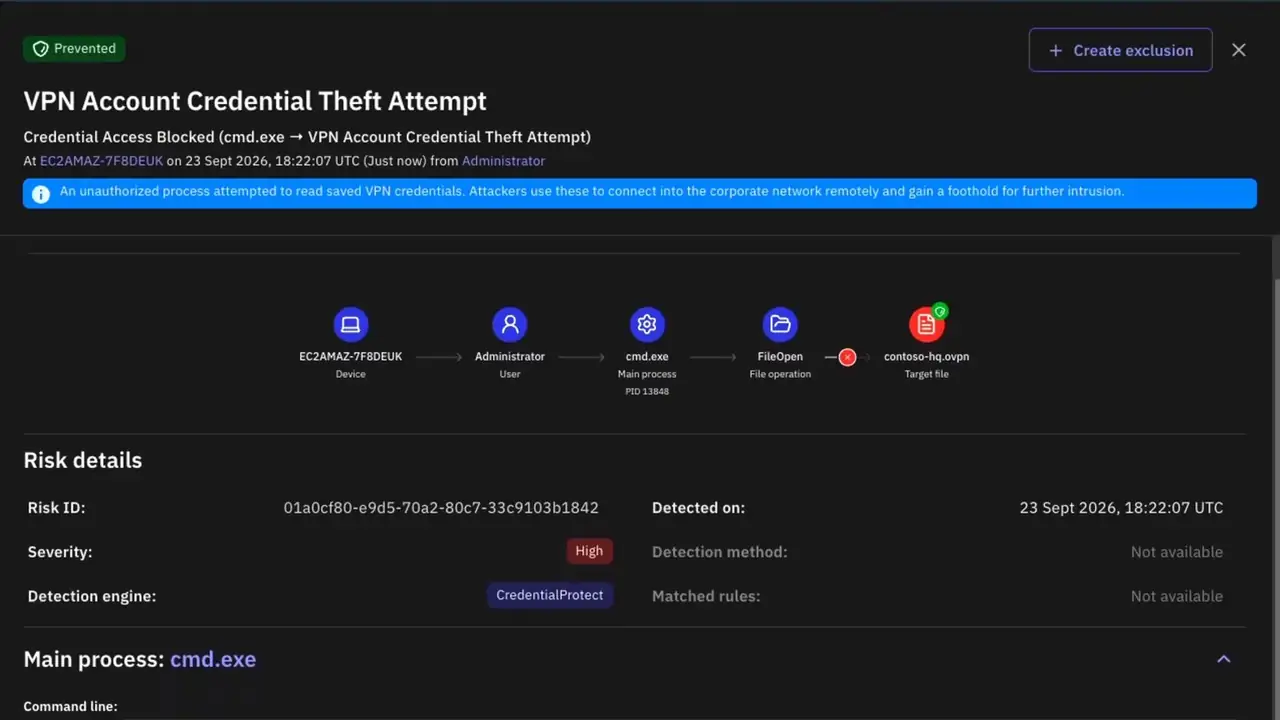
Credential theft, stopped on the device
The script goes after a password vault, browser cookies, FTP and VPN profiles and an SSH key. Each copy is blocked before it completes and the user sees a short notice. The console records each attempt with the full chain from device to file.
Independent evidence · Cipher Security Labs, Sept 2026
An independent test recorded 13 of 15 attack techniques stopped, against 2 for a leading EDR.
Both products ran in prevention mode against identical activity, and the results scored what actually happened on each machine. There was no technique the comparison product stopped that 1stProtect did not.
| Test | 1stProtect | Leading EDR |
|---|---|---|
| Credential theft by an unknown process | 14 of 14 | 0 of 14 |
| Trusted Windows tools used for untrusted things | 44 of 44 | 13 of 44 |
| Self-protection after a reboot into Safe Mode | Held | Removed |
| Fifteen shared techniques, fully stopped | 13 of 15 | 2 of 15 |
By industry
The same engine applies wherever a valid login can reach information that matters.
Law firms
Blocks credential theft and hidden commands after a “call from IT”, even in court with no connection.
Healthcare
Protects clinical workstations on isolated networks and supports PHIPA risk assessments.
Insurance and finance
Judges what a session does after a help-desk reset, when every login check says yes.
Manufacturing and OT
Full enforcement on air-gapped hosts, from first boot and in Safe Mode, on modest hardware.
Public sector and education
Adds prevention beside Microsoft Defender; deploys through Intune and reports to Sentinel.
Organisations adopting AI
AgentProtect gives every AI agent a least-privilege boundary, checked in under 100 milliseconds.
It installs in about two minutes and runs beside what you already have.
- Systems
- Windows 10 and 11, Windows Server 2016 and later
- Installation
- One command, no reboot
- Architecture
- User mode, no kernel driver
- Runs beside
- Microsoft Defender and other endpoint tools
- Deploy and report
- Intune, Jamf, Kandji; Microsoft Sentinel or any SIEM
- Assurance
- SOC 2 Type II and ISO 27001 (company-reported)
1stProtect is one layer of Audcomp Cyber Security Services. It sits alongside Endpoint Protection and our SOC & MDR team, and for organisations deploying AI it is the guardrail around the agents you build with our AI Services.
Free evaluation · Delivered by Audcomp
See what 1stProtect would block on your own endpoints, free for three months.
- 01Audcomp installs 1stProtect in audit mode, so nothing is blocked.
- 02You review each action it would have blocked, with the reason behind it.
- 03We run a live, safe credential-theft and hidden-script test with your IT lead.
- 04You switch on prevention when ready, or walk away with no obligation.
Questions we hear most often
- We already have antivirus or EDR. Why add this?
- Antivirus and EDR are good at finding known threats and unusual behaviour, and you should keep them. 1stProtect adds the decision they are not designed to make: whether a specific action should be allowed, judged on the device before it completes.
- Will it slow our people down?
- It decides in about 400 microseconds and runs in user mode, so people work exactly as they do now.
- Who installs and supports it?
- Audcomp, from Ancaster. Installation takes about two minutes per computer with no restart.
- Which devices does it protect?
- Windows 10 and 11 computers and Windows Server 2016 and later.
Get started today
Talk to Audcomp About 1stProtect
Our security specialists will contact you within one business day. Audcomp is an authorized Canadian reseller of 1stProtect.
Test results: Cipher Security Labs, September 2026. 1stProtect is a trademark of 1stProtect Corp.